> For the complete documentation index, see [llms.txt](https://spice.docs.medtroniclabs.org/llms.txt). Markdown versions of documentation pages are available by appending `.md` to page URLs; this page is available as [Markdown](https://spice.docs.medtroniclabs.org/product/roadmap.md).

# Roadmap

## Roadmap & Upcoming Releases

We build our product roadmap using the "Now, Next, Future" framework to set our product focus and vision. The roadmap below is high level. It does not list every enhancement, bug fix or feature set in each release, and it may change as we learn from implementers and users. For how we prioritise, see [Prioritization Process](#prioritization-process).

### Now

| Theme                        | What it delivers                                                                                                                                                                                    |
| ---------------------------- | --------------------------------------------------------------------------------------------------------------------------------------------------------------------------------------------------- |
| **Counselling messages**     | Condition- and stage-based counselling messages shown to health workers across antenatal, postnatal and NCD services, so each visit includes the right advice for the person's condition and stage. |
| **Service and data quality** | Continued work on service reporting accuracy, data migration tooling for programmes moving from earlier systems, and mobile and API performance.                                                    |

### Next

| Theme                                          | What it delivers                                                                                                                                                                  |
| ---------------------------------------------- | --------------------------------------------------------------------------------------------------------------------------------------------------------------------------------- |
| **Member and household transfer**              | Move a member or a whole household from one health worker's area to another, for example when a family relocates, with notification to the receiving worker.                      |
| **Transfer notifications**                     | Tell the sending and receiving health workers when a transfer is requested or completed.                                                                                          |
| **More clinical workflows**                    | Further community and facility workflows, building on maternal and child health, NCD and eye care. Candidates include TB and HIV, immunisation, and community-based surveillance. |
| **Distance and directions to a household**     | Show the distance and directions to a household, for example through a maps integration.                                                                                          |
| **Health worker activity through geo-tagging** | Use the location recorded with assessments and follow-ups to show where health workers have worked.                                                                               |

### Future

| Theme                             | What it delivers                                                                                                                         |
| --------------------------------- | ---------------------------------------------------------------------------------------------------------------------------------------- |
| **Workflow builder**              | Let clinical authors and implementers add new workflows, with clinical decision support that follows country-specific guidelines.        |
| **Patient application**           | Give patients access to their own longitudinal record, to upload assessments, and to receive adherence nudges and appointment reminders. |
| **Insights generation**           | An analytics module that generates insights for each type of user.                                                                       |
| **Patient retention model**       | A model to identify patients likely to be lost to follow-up, so interventions can reach them before they drop out of care.               |
| **Assistants for health workers** | Exploring large language models to help health workers, from job-aid chat to personalised education.                                     |

### Recently delivered

* **Household and member registration** with consent, and an expanded community workflow set for maternal and child health.
* **NCD workflows** for screening, confirm diagnosis, assessment, follow-up and dispensing, with service history.
* **Eye care and cataract** screening and assessment workflows.
* **Other services** workflow for additional community programmes.
* **Telesupport and telecounsellor roles** in the admin portal and the mobile app, for call-based follow-up.
* **Role-based menu management** from the admin portal.
* **In-app dashboards** for health workers, supervisors and managers.
* **Daily service limits** across NCD, eye care and cataract assessments.
* **Offline sync improvements**, including bulk upload per member and faster first-time sync.
* **Optional FHIR partitioning by administrative area** for large deployments.
* **Historical data migration tooling** for moving records from earlier systems.

## New Feature Requests & Prioritization

### **Submitting Feature Requests**

To submit a new feature request, raise an issue in GitHub in the relevant project (for example the mobile app, admin web portal, backend services or reporting). To best prioritize the feature requests, we need to understand the why, what, and how of the requests coming from the end users.

**Follow the steps below to submit a new feature request:**

1. Add a descriptive Title summarizing the feature
2. Describe the feature with as much detail as possible in the Description field. Include the following details:
   1. Problem Statement
   2. Priority (Highest, High, Medium, Low)
   3. Impacted Users
   4. Impacted Workflows
3. Tag the issue as a "enhancement" using the labels
4. If possible, attach any images to further explain the feature request (screenshots are very helpful!)

### **Prioritization Process**

Medtronic LABS will review all feature requests and issues submitted through the formal channel. In order to prioritize the issues and features, we follow the below process to prioritize new feature requests, enhancements, and bug fixes/issues.

#### Prioritizing Framework: MoSCoW: Must Have, Should Have, Could Have, Won't Have

<table data-header-hidden><thead><tr><th width="212"></th><th></th></tr></thead><tbody><tr><td><strong>Must Have</strong><br>Highest Priority</td><td>We genuinely cannot launch without this due to business needs, legal reasons and safety concerns—it would be a terrible idea to launch without this!</td></tr><tr><td><strong>Should Have</strong><br>High Priority</td><td>It would be best to include these, but our product won’t be an absolute failure without them.</td></tr><tr><td><strong>Could Have</strong><br>Medium Priority</td><td>Nice-to-haves if we have the resources and time. But not necessary for success. Think of how each requirement (or lack thereof) will affect customer experience.</td></tr><tr><td><strong>Won't Have</strong><br>Low Priority</td><td>We’ve made an active decision that it’s not coming out with this launch.</td></tr></tbody></table>

#### Factors that influence the prioritization:

1. Value Proposition
2. Stakeholder Prioritizations
3. Feedback from the end users
4. Number of users Impacted
5. Product Usage and Adoption metrics
6. Patient Outcomes
7. Patient Engagement
8. Design, Development and Efforts
9. Priority of the issue/defect.

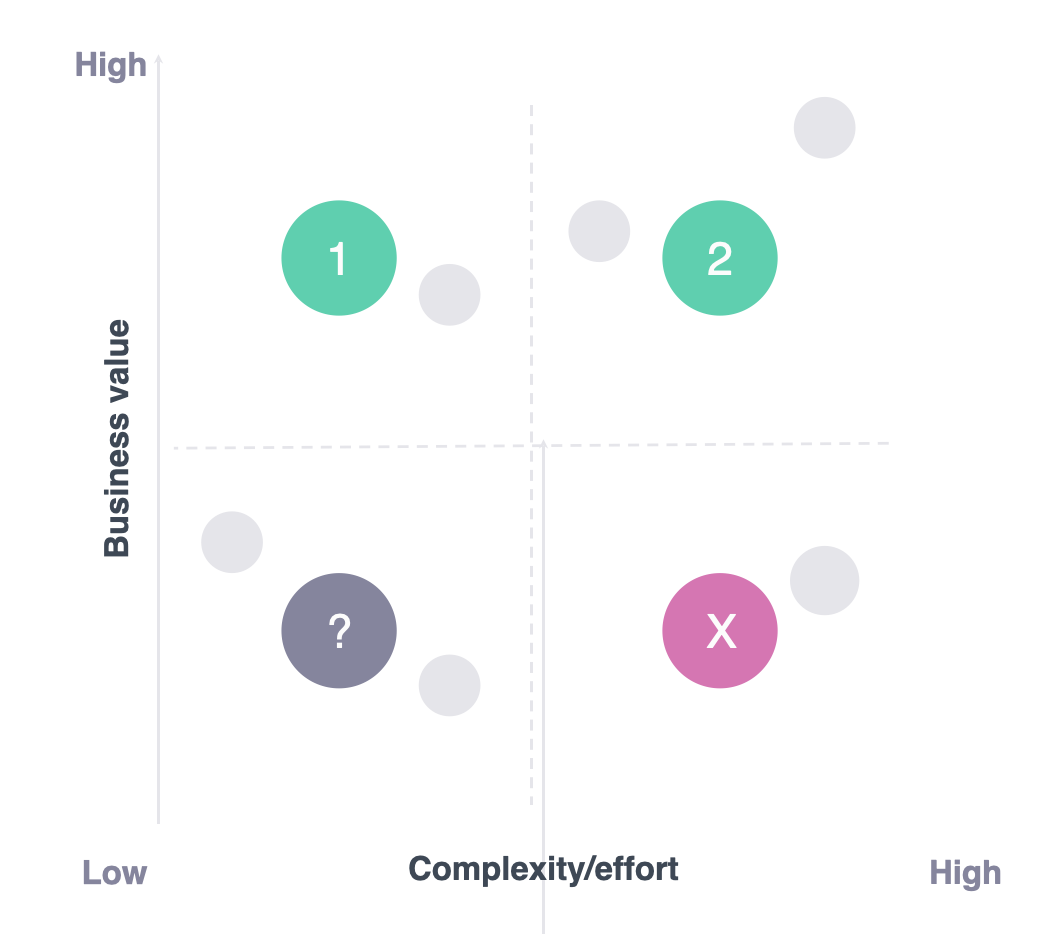
We also look at the Value/Effort scale for feature requests.

1. The objective is to identify features that will have the highest impact with the lowest effort.
2. Build these first. Next, build high impact, high effort features. This will also differ based on the request from different region.
3. Each feature is rated by a) effort to build the feature and b) potential impact on business value - Highest, High, Medium Priority items from the previous process.
4. Deprioritizing low impact, low effort features, and do NOT build low impact, high effort features!

<figure><img src="https://2347658875-files.gitbook.io/~/files/v0/b/gitbook-x-prod.appspot.com/o/spaces%2F7inBQ0zjo0nwpqK5625P%2Fuploads%2FKLp7fHoOuhrvGVMV10w2%2Fimage.png?alt=media&amp;token=ef7cede4-2f35-4f68-a256-bacbf57b214e" alt="" width="375"><figcaption></figcaption></figure>
